Estimate card-processing fees and net receipts with separate percentage, transaction, fixed and refund charges.
The interactive form requires JavaScript. The worked example, formulas and source links below remain available.
Read the card processing fee calculator result
A card-processing quote often combines a percentage of sales, a fee for each transaction, fixed charges, and refund fees. The advertised percentage alone doesn’t show the total cost. This calculator combines those entered components, subtracts refunds, and estimates the net receipts from a defined group of card sales.
The tool is useful for checking a simple processor quote or comparing how transaction size affects cost. It doesn’t predict interchange, identify a merchant’s eligibility for a pricing program, or read a processing statement. The default percentages and dollar charges are hypothetical examples. Replace them with the actual components of the pricing arrangement you want to model.
Card processing fee: distinguish the merchant price from interchange
Visa’s U.S. interchange publication distinguishes interchange between participating financial institutions from the merchant discount paid by a merchant to its financial institution. A processor’s total charge can therefore be a different measure from a network’s interchange schedule. This calculator uses the price charged to the merchant that you enter.
If a quote is a single percentage plus a transaction fee, the model can represent those components directly. If it’s interchange-plus, tiered pricing, or a mix of different rates, one percentage is an approximation unless you first reconcile the underlying activity and charges. Don’t enter a processor markup as though it includes every other charge when the agreement adds those costs separately.
Separate a mathematical estimate from a statement reconciliation. A statement can include charges from another period, adjustments, reserves, or settlement timing that this model doesn’t contain. The result should be compared with the same sales activity and fee scope, rather than with a bank deposit that may combine unrelated settlement batches.
Define the sales and refunds being measured
Enter gross card sales before the refunds included in this calculation, plus the number of original sale transactions. The refund volume and refund count must belong to those same original sales. This same-cohort requirement matters because a calendar month’s refunds may relate to purchases made in an earlier month.
For example, using this month’s gross sales and every refund processed this month can mix two different groups of transactions. That may be useful for a cash-flow report, but it doesn’t match this calculator’s cohort model. Choose a consistent group of original sales and their related refunds, or prepare a separate settlement-period reconciliation for the actual bank activity.
The model allows at most one refund transaction per original sale. It doesn’t represent several partial refunds against one purchase. Refund volume can’t exceed gross sales, and a positive refund amount requires a positive refund count. Positive sales also require a positive original transaction count so that average-sale and per-transaction measures have meaningful inputs.
Enter the fee components and refund convention
The percentage fee applies to gross card sales before refunds. The per-transaction fee applies to every original sale transaction. Add the fixed processing charge for the same period and any additional fee for each refund. These are the only fee components included; chargebacks, reserves, taxes, cross-border adjustments, and other price tiers are outside this model.
Original processing fees aren’t returned when a sale is refunded in this explicit scenario. That assumption isn’t a claim about every processor. If an agreement returns part of the original percentage or transaction fee, this tool’s refund treatment will overstate the retained processing cost for that agreement unless the difference is reconciled separately.
Match the fixed fee to the period being measured. A monthly charge shouldn’t be added unchanged to a single day’s sales unless that’s intentionally the full cost being assigned to that day. If a cohort spans several months, determine how the relevant fixed charges are allocated and keep that decision with the inputs.
How the card processing fee calculator works
Percentage cost = gross card sales × entered percentage rate. Transaction cost = original transaction count × fee per transaction. Refund cost equals refund count multiplied by the additional refund fee. Total modeled fees are percentage cost plus transaction cost, fixed cost, and refund cost.
Net receipts = gross sales − refunded sales − total modeled fees. A refund’s principal is returned sale proceeds, not a processing fee. Keeping it separate prevents a business with many refunds from reporting the whole refunded amount as a fee charged by the processor.
Effective fee percentage = total fees ÷ gross sales × 100. Average sale is gross sales divided by original transaction count, and fee per original transaction is total fees divided by that count. The effective percentage uses gross sales before refunds. If you calculate a percentage on sales retained after refunds, label that different denominator explicitly.
Card processing fee calculator example: $20,000 across 400 original sales
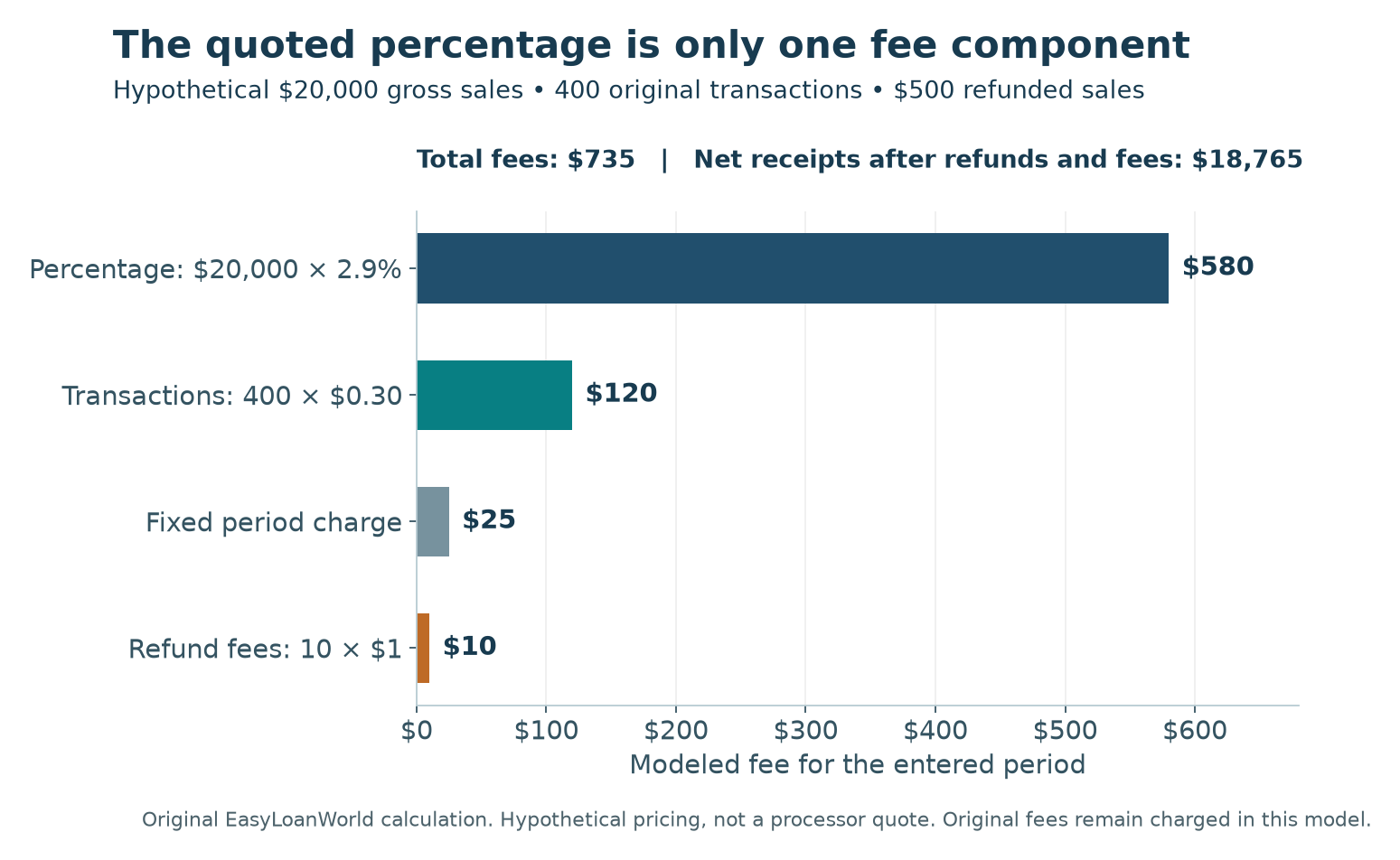
Suppose gross card sales are $20,000 from 400 transactions. The entered price is 2.9% plus $0.30 per original sale, with a $25 fixed charge. Ten of those sales are refunded for a total of $500, and each refund has a separate $1 fee. Original processing fees remain charged under the model.
| Component | Calculation | Amount |
|---|---|---|
| Percentage fee | $20,000 × 2.9% | $580 |
| Original transaction fees | 400 × $0.30 | $120 |
| Fixed fee | Entered period charge | $25 |
| Additional refund fees | 10 × $1 | $10 |
| Total modeled fees | $580 + $120 + $25 + $10 | $735 |
| Refunded sales principal | Entered same-cohort refunds | $500 |
| Net receipts | $20,000 − $500 − $735 | $18,765 |
The effective fee rate is 3.675%, displayed as approximately 3.68%. Average original sale size is $50, and total fees per original transaction are about $1.84. The actual average fee is higher than the quoted 2.9% component because the model also includes transaction, fixed, and refund charges.
If you divide the same $735 by the $19,500 of sales retained after refunds, the result is approximately 3.77%. That’s a valid differently labeled comparison, but it isn’t the calculator’s gross-sales effective rate. Don’t compare the two percentages without noticing the denominator change.
Test the effect of transaction size
Keep gross sales at $20,000 but increase original transactions from 400 to 800, leaving the other example inputs unchanged. Average sale falls from $50 to $25. Percentage cost stays $580, but original transaction fees rise from $120 to $240. Total fees become $855, net receipts become $18,645, and the effective fee rate becomes 4.275%, or about 4.28%.
The extra $120 cost comes from the transaction-count component alone. A business with many small purchases can therefore experience a different effective cost from another business with the same gross card sales and fewer large purchases. Compare proposed processors using the transaction pattern you expect, not only a convenient round sales total.
Fixed fees have a separate volume effect. Their dollar amount remains the same when only sales volume changes, so their percentage burden varies. When comparing a lower percentage with a higher fixed charge, run the same low-volume and higher-volume scenarios for each quote. Don’t assume the offer that’s cheaper at one sales level is cheaper at every level.
Use the results for a quote or statement review
Make a list of the charges included in the quoted percentage and those billed separately. Confirm the original-transaction and refund policies, fixed charges, and any minimums. Run the calculator only after the components describe a coherent pricing arrangement. A missing fee can’t be recovered by displaying more decimal places.
The percentage component is calculated on aggregate gross sales. The card processing fee calculator doesn’t reconstruct each original sale and round its percentage fee separately. If the actual processing agreement rounds at a different level, a statement can differ slightly from this aggregate estimate. A detailed reconciliation needs the transaction amounts and the provider’s rounding convention, not an adjustment chosen only to make the totals match.
For two quotes, use the same sales amount, original transaction count, refunds, and period before changing the pricing inputs. Save each result with its fee assumptions. If one quote applies different rates to different card or transaction types, run those groups separately where the model fits and reconcile the fixed fees once. Adding a full fixed charge to every subgroup would overstate the combined cost.
Use the fee-component chart to identify what drives the estimate. A large transaction-fee bar suggests transaction count matters; a large fixed-fee bar suggests volume affects the effective rate. The gross-sales reconciliation then shows how refunds and fees reduce receipts. These are two views of the same model, not additional charges to add together.
Keep processing cost separate from product profitability. The profit margin calculator can examine a consistently defined cost and revenue basis, while the business break-even calculator compares fixed and variable costs with sales volume. Decide where processing costs belong in that separate analysis so they aren’t counted twice.
Card processing fee calculator questions
Does the calculator show when deposits reach my bank?
No. Net receipts are an arithmetic total for the entered activity. Settlement delays, reserve holds, and payout schedules can change the timing of available cash. Use a dated cash record or the cash runway calculator for a separate cash-planning scenario.
Why can a refund make net receipts negative?
Refunded principal and retained fees can exceed the remaining sales proceeds in a scenario. The card processing fee calculator preserves that shortfall instead of assuming it disappears. Actual processor settlement and account-funding terms determine how such a balance is handled.
What happens when gross sales are zero?
A fixed fee can still create a dollar cost, but an effective fee percentage on zero sales is undefined. Don’t interpret the missing percentage as a zero-cost result. Review the dollar fee and the consistency of the transaction and refund entries.
Questions or corrections?
Send a question or report an issue with a published page.