Square Loan Minimum: Find the Cash Gap Before It Is Due
A two-case worked illustration that tracks an additional loan allocation and the cash remaining after other stipulated uses.
Estimated reading time: 8 minutes
A Square loan minimum check starts with the payments credited in the relevant window. Reconcile the remaining amount once before allocating business cash elsewhere.
A receipt-based repayment can leave another amount to cover before the deadline.
For an existing U.S. Square loan, this guide compares two fictional payment-window records. It separates the additional loan allocation from the cash needed for other purposes. It doesn’t evaluate a new offer or calculate a borrowing rate.
Find your minimum and due date in Square Dashboard; your agreement specifies maturity, when the full balance is due.
This illustration uses settled card receipts from the loan-linked location, excluding bitcoin. Square’s repayment calculation includes card-paid tips and taxes; processing fees are separate.
Collections continue after the minimum is met. A missed minimum or maturity balance may trigger a higher repayment rate and a debit from your Square balance and/or linked bank account.
Square loan minimum: two records, one calculation
Assume each alternative has a confirmed $900 target for the identified window. The table’s repayments are already posted and confirmed to count toward that target. There are no arrears, earlier-window credits, pending entries, reversals or other payments. Both windows occur before maturity, and the remaining loan balance exceeds all amounts modeled here.
All amounts below are invented records, not Square prices, typical sales or available offers. No repayment or processing percentage is being quoted. The $3,000 operating outlay excludes every other row. The separate cash allocation is the fictional owner’s already-determined amount for tips and taxes, not a tax calculation.
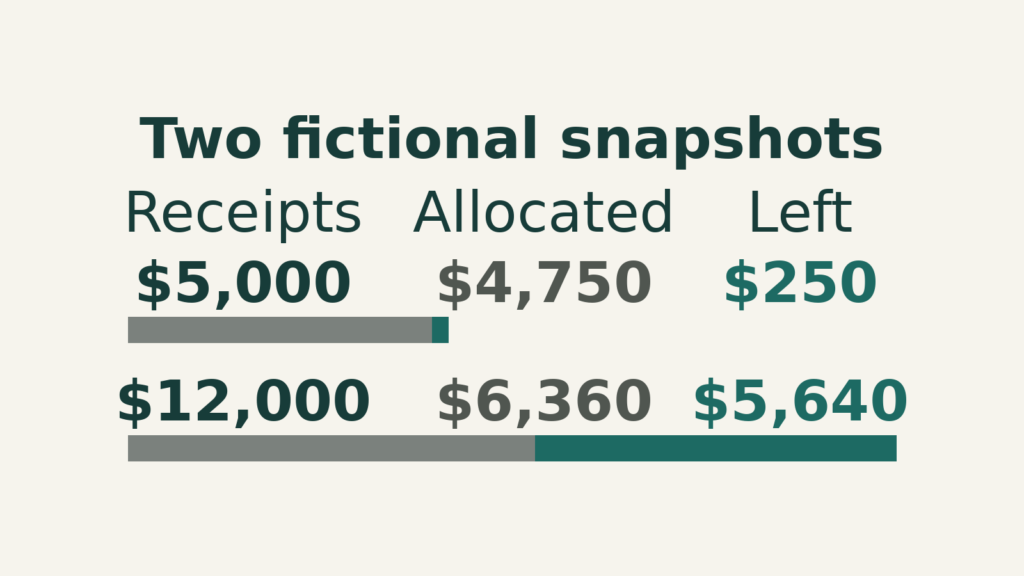
| Measure | A | B |
|---|---|---|
| Settled gross receipts | $5,000 | $12,000 |
| Recorded processing fees | $150 | $360 |
| Repayments already credited | $500 | $1,200 |
| Minimum for this window | $900 | $900 |
| Additional loan allocation needed | $400 | $0 |
| Separate cash allocation | $700 | $1,800 |
| Other operating cash | $3,000 | $3,000 |
| Cash remaining after those allocations | $250 | $5,640 |
Square loan minimum: calculate the uncovered amount once
Subtract the repayments credited to this window from its target. Use zero for the additional amount needed if the result is negative.
- A: $900 − $500 = $400 still to allocate.
- B: $900 − $1,200 is below zero, so the additional allocation is $0.
In A, the $500 already paid and the $400 still needed total $900. Don’t add another $900 to the posted $500. In B, retain the actual $1,200 cash outflow; don’t replace it with the smaller $900 target or assume the difference returns to the business.
Check what remains for the business
A leaves $5,000 − $150 − $500 − $400 − $700 − $3,000 = $250. Ignoring the uncovered amount would show $650 and overstate the unallocated cash by $400.
B leaves $12,000 − $360 − $1,200 − $0 − $1,800 − $3,000 = $5,640. The larger repayment is already included once.

The $400 in A is an additional allocation for the loan, not necessarily a need for new external financing. Under these stipulated totals, it fits within existing cash receipts. Whether the right account has enough available on the actual payment date is a separate test.
Square loan minimum: keep posted and pending entries distinct
The original A snapshot has $500 already credited toward a $900 window target. Its additional allocation is $400. A new pending entry can’t be treated as a confirmed credit solely because it would reduce that gap.
For an independent later snapshot, assume another $200 has actually posted, is confirmed to count toward the same window and has already left business cash. Credited repayment is now $700 and the remaining target amount is $200.
Using the same $5,000 receipts, $150 processing fees, $700 separate allocation and $3,000 other operating cash, the revised reconciliation is $5,000 minus $150 minus $700 minus $200 minus $700 minus $3,000, leaving $250.
The result matches A because total loan cash is still $900: $700 paid plus $200 remaining instead of $500 paid plus $400 remaining. A posted payment moves money between those two lines; it doesn’t create additional free cash.
If you reduced the remaining allocation to $200 but left the paid line at $500, you would overstate the remainder by $200. Conversely, counting the new $200 in both paid and remaining amounts would understate cash.
Keep the account’s credited-window amount and the actual cash movement reconciled. If one is pending or the dates differ, label the mismatch and ask Square about it. Don’t overwrite the source record to force agreement.
Square loan minimum: vary the target without changing receipts
For a separate stress test, restore A’s original $500 credited amount but assume its confirmed window target is $1,100 instead of $900. The additional amount becomes $600. Every other original A input remains unchanged.
Cash remaining falls from $250 to $50, a $200 reduction matching the target increase. This tests one invented change only. It doesn’t quote Square’s minimum for any account or suggest that the target can be chosen by the borrower.
Now consider original B with $1,200 already credited against its $900 target. The additional amount remains zero. Its $300 excess over that target isn’t a new receipt, a credit to spend or permission to replace the actual repayment with $900.
A minimum-window calculation also doesn’t establish the full remaining loan balance. The original cases expressly occur before maturity and assume that balance exceeds the modeled amounts. A maturity calculation would need the actual complete balance and agreement.
Test the payment-date account separately from the aggregate total
The positive $250 A remainder is an across-business snapshot. For an independent location-of-cash illustration, suppose $400 must be available in a particular payment account, but only $300 is confirmed spendable there on that date.
That account has a $100 gap even if money exists elsewhere in the business. An intended transfer doesn’t close it until the amount and availability on the relevant date are established.
List transfer initiation, expected arrival and confirmed availability separately. Don’t count the same $100 both in the sending account and as a new receipt in the destination when totaling business cash.
Likewise, future unsettled sales can’t be inserted into the original settled-receipts line. If you model future receipts, identify a new scenario with explicit timing and uncertainty. The snapshot itself doesn’t forecast those sales.
The separate tips-and-taxes allocation remains a chosen input, not a tax calculation. Check that operating outlays exclude it, as stipulated, before subtracting both. Otherwise the worksheet could reserve the same obligation twice.
Build a window-specific reconciliation packet
Put the loan identity, window dates, confirmed target and due date at the top. List each repayment with date, amount, status and whether Square confirms it counts toward that window. Keep unrelated window totals out of this sum.
Below that, list settled receipts and their associated processing and loan deductions under their actual definitions. Reconcile any net transfer to its underlying components rather than subtracting deductions again from a net amount.
For example, if a source report already shows cash after processing fees and loan repayment, subtracting those same fees and repayment once more would duplicate them. Use either a complete gross reconciliation or a clearly defined net starting figure.
End with separate questions: which amount is still required, where will it be funded and when is it available? Contact Square before the due date about unresolved requirements or difficulty. A sound worksheet helps state the problem; it doesn’t change the contractual deadline.
Save each Square loan minimum calculation with its snapshot date. When another repayment posts, update both the credited total and related cash movement. Preserve the earlier version so a changed remainder can be explained. A smaller remaining target can reflect money already paid; it isn’t automatically an improvement in the business’s total cash position.
If a repayment is reversed, obtain the revised window credit and cash records before recomputing. A historical posting shouldn’t remain in the confirmed-credit sum after the account shows it was reversed. Record the reversal separately so the reconciliation explains why an apparently covered target may have become uncovered again.
Use the result without overstating it
This is an aggregate cash reconciliation across the business, not a prediction of debit timing or the lowest bank balance during the window. It assumes the listed receipts have settled. A positive remainder doesn’t establish that every earlier obligation could be paid on time.
For your own calculation, replace the fictional records and retain their dates. If the target, credited amount or separate obligations are unresolved, keep the result unresolved. Don’t fill a missing figure with an old example or move a due date to make the arithmetic work.
Contact Square before the due date if repayment is difficult or the required amount is unclear.
This narrow test doesn’t establish full-term affordability, payoff readiness or eligibility for another loan.
If your Square balance includes reserves, also check reserve release and bank-transfer timing. For a wider cash calendar, compare daily, weekly and monthly business loan payments.