Calculate interest using an explicit principal, rate, number of days and day-count basis.
The interactive form requires JavaScript. The worked example, formulas and source links below remain available.
Read the calculator result
This calculator estimates interest on an unchanged principal for a stated number of days. Enter the principal, annual rate, day count, and either a 365-day or 360-day year basis. The result shows modeled interest and principal plus interest. It doesn’t calculate an amortizing loan payment or automatically include fees.
Simple interest is useful for checking a clearly defined accrual period. The calculation applies the rate to principal without adding prior interest to the interest-bearing balance. If the principal changes or interest is capitalized, a single constant-balance calculation no longer describes the whole period.
The CFPB’s explanation of simple and precomputed loan interest emphasizes that the interest method matters. An actual loan can calculate simple interest on an outstanding balance that changes with payments. This tool models one constant-balance segment of that process.
Simple interest: enter the rate and time on matching terms
Principal: enter the amount on which interest accrues during the entire modeled period. Use the starting balance for that period, not necessarily the original amount borrowed. If a principal payment occurs partway through, split the calculation into segments before and after the payment.
Annual rate: enter a percentage such as 6 for 6% per year. The input is an annual simple-interest assumption. Don’t enter a monthly percentage without converting and checking what the contract actually means. The tool doesn’t determine a fee-inclusive APR.
Actual days: enter the number of days for which interest is calculated. The calculator doesn’t count dates or determine whether the first or last day is included. Use the convention relevant to the account or agreement. Three calendar months aren’t always 90 days.
Year basis: select 365 or 360. This is the denominator used to convert the entered annual rate into a daily rate. Actual/360 uses the actual entered day count divided by 360; it isn’t the same as a 30/360 calendar convention that adjusts dates to standardized months.
How the calculator works
Interest equals principal × annual rate × days ÷ year basis, with the percentage rate expressed as a decimal. Principal plus interest equals principal multiplied by [1 + annual rate × days ÷ year basis]. There is no exponent because the model does not charge or credit interest on previously accrued interest.
At a constant principal and rate, interest grows in a straight line with time. Doubling the number of days doubles the interest. Doubling principal also doubles interest. These relationships are useful checks when evaluating whether an entered value or displayed result makes sense.
A zero principal, zero rate, or zero days produces zero interest. Negative amounts and an undefined year basis do not describe the intended model. The calculator should ask for valid inputs rather than produce a negative interest bill or an invalid numerical result.
Simple interest calculator example: $10,000 at 6% for 90 days
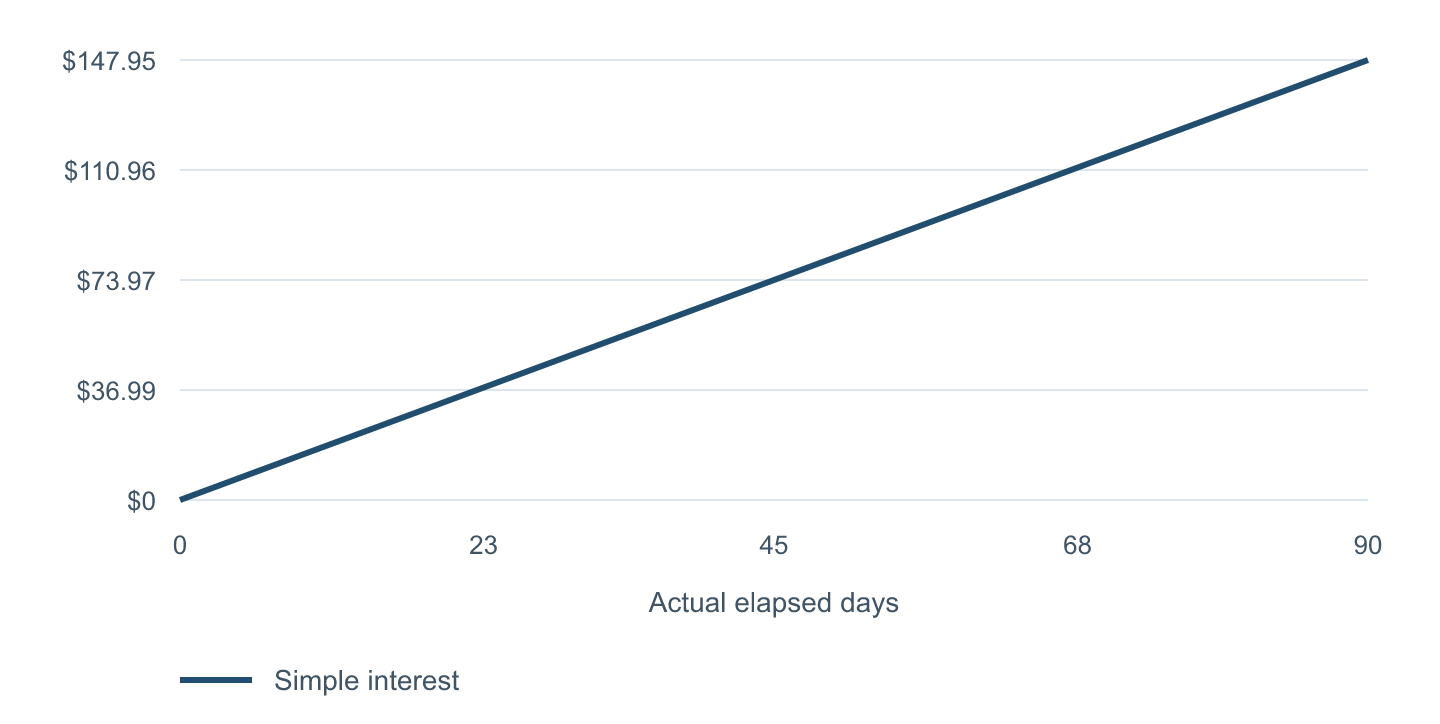
Assume a hypothetical principal of $10,000 remains unchanged for 90 actual days at a 6% annual simple-interest rate. On a 365-day basis, interest is $10,000 × 0.06 × 90 ÷ 365, or approximately $147.95. Principal plus interest is approximately $10,147.95.
| Measure | Actual/365 | Actual/360 |
|---|---|---|
| Principal | $10,000 | $10,000 |
| Annual simple rate | 6% | 6% |
| Actual days | 90 | 90 |
| Interest | $147.95 | $150.00 |
| Principal plus interest | $10,147.95 | $10,150.00 |
The difference is approximately $2.05. It comes entirely from dividing by 360 instead of 365. Neither result can be chosen simply because it’s more favorable; the applicable agreement determines the convention for a real transaction.
The example rate is hypothetical. The calculation doesn’t establish a current lending offer, permitted late charge, or contractual payoff amount. Actual fees, payment timing, and rounding may change the amount due.
Simple interest: why the day-count basis matters
For the $10,000, 6% example, each day adds approximately $1.64 on a 365-day basis. Thirty days produce about $49.32, 90 days about $147.95, and 180 days about $295.89. A full 365 days produce $600 when the denominator is also 365.
Using a 360-day denominator with 365 actual days produces approximately $608.33 at the same nominal annual rate. That doesn’t change the entered rate; it changes the number of daily accrual units applied over the period. This is one reason to read the day-count convention rather than comparing rate labels alone.
Specific programs can prescribe their own methods. The Treasury’s Prompt Payment interest page is an example of program-specific rules. Its method shouldn’t be assumed to govern every private loan, deposit, or invoice.
Split the calculation when principal changes
Suppose the $10,000 example lasts 90 days, but a $2,000 principal-only reduction occurs after the first 45 days. The first segment uses $10,000 for 45 days; the second uses $8,000 for 45 days. At 6% on a 365-day basis, the segment interest amounts are approximately $73.97 and $59.18.
Total modeled interest is approximately $133.15, compared with $147.95 if principal remained $10,000 for all 90 days. The difference is approximately $14.79. This example deliberately specifies a principal-only reduction. An actual payment may first satisfy accrued interest or other amounts under the agreement.
For several balance changes, calculate each interval separately and add the interest. Keep the dates, balances, and number of days in a clear schedule. Using the original balance for every day after principal has been repaid would overstate interest under this simple-interest model.
Simple and compound interest answer different questions
Simple interest does not itself earn interest. Compound interest adds credited interest to the balance used in later periods. To see the difference, consider $10,000 at 6% for three full years. Simple interest is $1,800, giving $11,800 in total.
With annual compounding at the same nominal 6% rate and no transactions, the balance becomes $10,000 × 1.063, or $11,910.16. The additional $110.16 results from growth on prior interest. Monthly compounding would be a further distinct assumption.
Use the compound interest calculator for a monthly-compounding projection with regular contributions. Use the nominal-rate-to-APY calculator to compare an annual nominal rate with its effective annual yield under a selected frequency. Don’t mix the result from one interest convention into another without identifying the change.
This isn’t a monthly loan-payment calculator
An installment loan usually combines interest and principal repayment over a schedule. Applying simple interest to the original principal for the entire term would ignore the declining balance. It therefore doesn’t calculate the same total interest as a fully amortizing loan with regular payments.
The loan payment calculator models equal monthly payments at a fixed contract rate. Its schedule calculates each month’s interest on the remaining balance. If a lender uses daily interest, actual payment dates can introduce additional differences.
Precomputed-interest arrangements have another structure. The CFPB source above describes why making extra payments can affect those agreements differently from a simple-interest balance. Ask which method applies before using a general calculation to estimate savings from early repayment.
Keep fees and cash received separate
This calculator estimates interest only. An origination fee, draw fee, account charge, or other cost can change the overall price of borrowing without changing the simple-interest calculation. A loan that advertises 0% interest may still involve fees.
APR can include charges beyond the contract interest rate. The CFPB’s rate-versus-APR explanation helps distinguish those terms. Do not call principal × rate × time a complete APR calculation when fees and payment timing have not been evaluated.
If a fee is deducted before disbursement, the loan net proceeds calculator shows the resulting cash shortfall and scheduled repayment cost. For an unpaid customer invoice, the invoice delay calculator separates a business’s financing estimate from a hypothetical customer charge.
Check the estimate against a statement or agreement
Confirm the interest-bearing principal, annual rate, actual days, day-count basis, and whether interest compounds or is capitalized. Then identify any payment or transaction that changes principal during the period. These inputs usually explain more than rounding a result to additional decimal places.
Retain an unrounded calculation for checking, but use the institution’s rules for an amount actually payable. A statement may round daily interest, interest for the period, or only the final total. Small differences can arise from that choice even when the broad method matches.
Avoid mixing an annual rate with a monthly time unit
A 6% annual rate is 0.06 in the formula. Ninety days on an Actual/365 basis are 90 ÷ 365 of a year. Multiplying $10,000 by 0.06 and then by 90 without dividing by the year basis would produce an amount that is 365 times too large.
Writing the units beside each input helps catch the error: dollars, annual decimal rate, and fraction of a year. This small check is especially useful when transferring a percentage from a spreadsheet or a quote that uses different time units.
Simple interest calculator questions
Is Actual/360 the same as 30/360?
No. Actual/360 divides the actual entered number of days by 360. A 30/360 convention adjusts dates using standardized 30-day months and separate rules. This calculator doesn’t perform those calendar adjustments; it uses the day count you supply.
Can I enter months instead of days?
The calculator expects days. Convert a period using the relevant agreement’s convention rather than assuming every month has 30 days. If actual calendar dates matter, count them consistently before entering the number.
Does principal plus interest equal my payoff quote?
Only if all relevant assumptions match and no other amounts apply. A real payoff may include accrued interest through a specific date, fees, or other contract items. Obtain the lender’s quote for a transaction that requires an exact settlement amount.
Does the tool determine an allowed interest rate?
No. It performs arithmetic using an entered rate. It doesn’t interpret a contract or decide what rate may legally be charged. The existence of a result isn’t authorization to impose it on another party.
Questions or corrections?
Send a question or report an issue with a published page.