Debt-to-Income Ratio: Audit the Inputs Before Using the Number
Reconcile the inputs behind a fictional mortgage ratio, identify mismatched figures and track isolated changes in a dated calculation record.

Two debt-to-income calculations can disagree even when both divisions are correct. Before debating the percentage, put the amounts behind each calculation side by side. A useful result is a dated record you can reconcile, rather than a number copied from a calculator without its assumptions.
Debt-to-income ratio, or DTI, compares monthly debt payments with gross monthly income, before taxes and deductions. Multiply the division by 100 to display a percentage. Lenders and loan products have different limits; one percentage is not a universal approval test. See the CFPB’s DTI explanation.
Separate an arithmetic check from an input decision
For a mortgage example, Fannie Mae’s qualifying rules use qualifying income and counted obligations, including the subject mortgage’s qualifying payment. Underwriting paths differ, and lenders may be more conservative. That is a specific program’s framework, not a rule for every loan. Ask the lender to confirm unfamiliar income or payment inputs instead of assuming your estimate is its accepted figure.
Keep two columns in your private notes: “amount I entered” and “amount confirmed for this calculation.” A blank confirmation is an unresolved question, not permission to substitute the most favorable value. Record the date beside each answer so a newer calculation does not get compared with an older set of inputs.
Build one fictional starting case
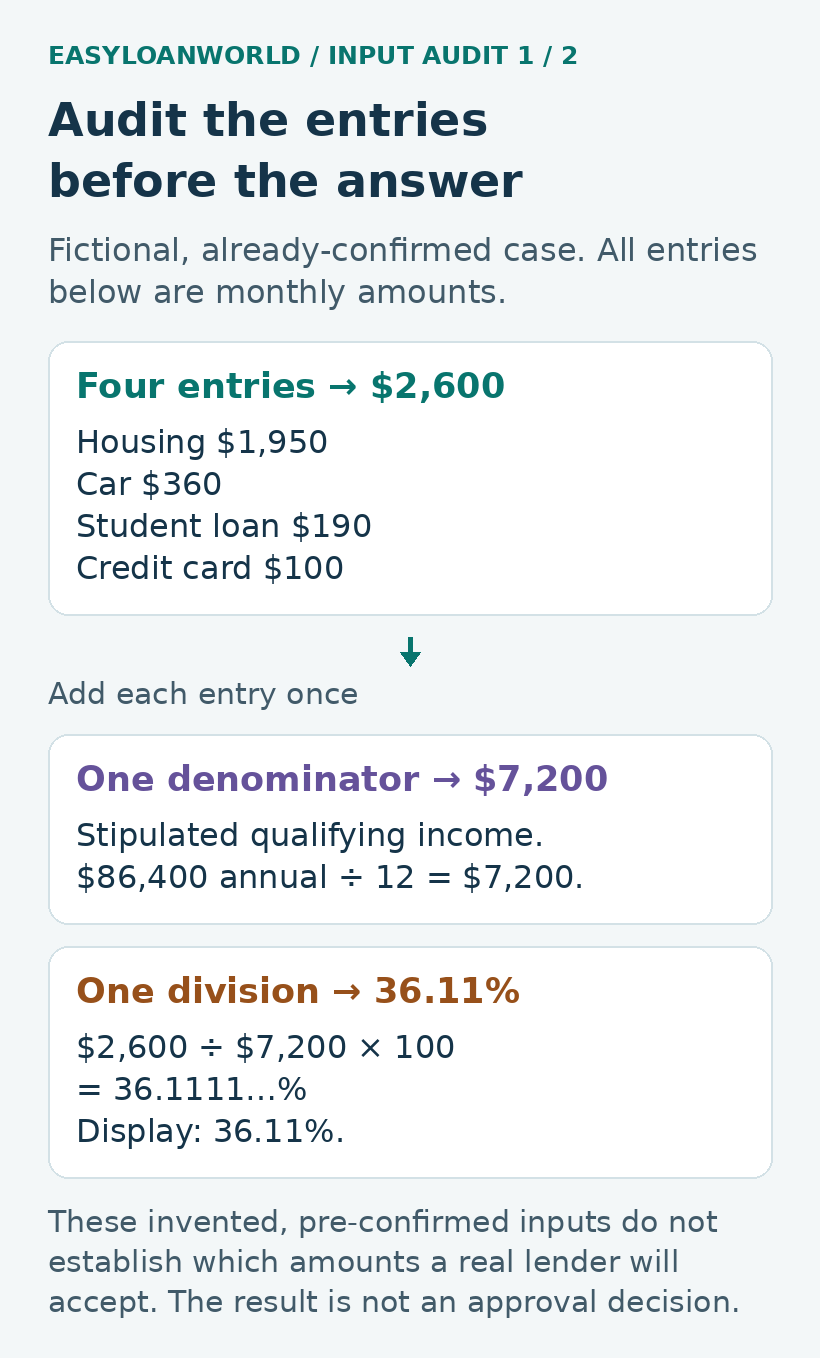
Suppose a fictional lender has already confirmed these figures for a particular mortgage calculation. The qualifying monthly income is $7,200. The qualifying housing payment is $1,950, including everything that lender counts within housing for this example. It is not merely a principal-and-interest quote. Other confirmed monthly obligations are:
- Car payment: $360.
- Student-loan payment counted in this case: $190.
- Credit-card payment counted in this case: $100.
The counted total is $1,950 + $360 + $190 + $100 = $2,600. Dividing $2,600 by $7,200 and multiplying by 100 gives 36.11%, rounded to two decimal places. These invented inputs illustrate the arithmetic; they do not describe an available loan, student-loan treatment rule or qualification decision.
Label each entry as a monthly payment. A $100 payment and a $100 outstanding balance are different inputs, even though the dollar sign looks identical. If someone entered an entire loan balance where this example requires a monthly payment, fix that entry before interpreting the resulting percentage.
Find out whether the two numbers measure the same thing
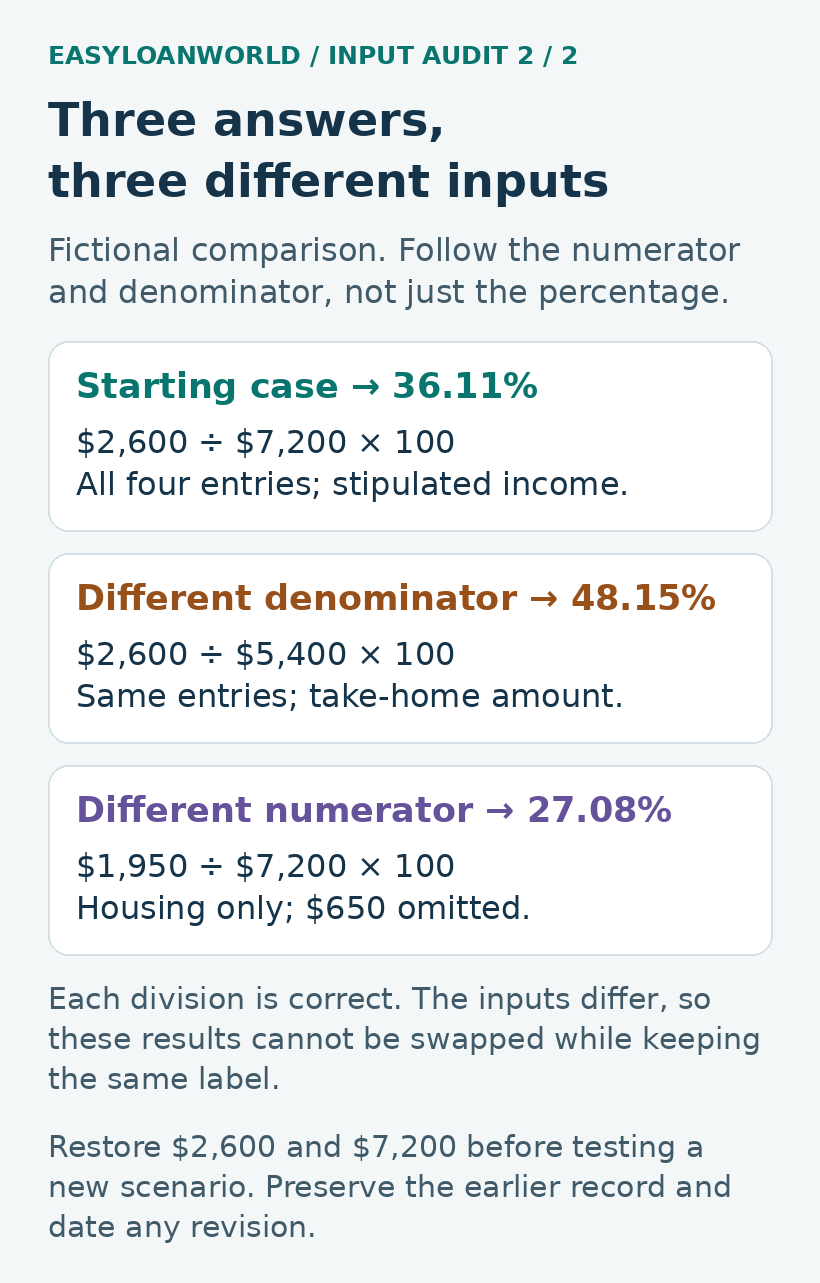
Now suppose take-home income in this fictional household is $5,400. The calculation $2,600 ÷ $5,400 × 100 produces 48.15%. That arithmetic is correct, but its denominator differs from the $7,200 used above. It cannot be substituted for the illustrated DTI and presented as if nothing changed.
A second calculation uses only housing: $1,950 ÷ $7,200 × 100 = 27.08%. That leaves out the $650 of other monthly obligations included in the starting record. It answers a housing-only question, not the total-obligation question in the 36.11% calculation.
When reconciling two worksheets, compare the labels before comparing the answers. Circle the top number, the bottom number and the period each covers. If those three items do not match, a different percentage may be expected. An apparently better result is not evidence that the underlying loan became easier to repay.
Change one input at a time
Return to the original $2,600 total and $7,200 income before running each of these independent scenarios. Do not carry a change from one scenario into the next.
- Income changes: if the confirmed monthly income is $6,600 instead, $2,600 ÷ $6,600 × 100 = 39.39%. The payment total has not moved.
- A new payment is counted: adding $250 produces $2,850 of obligations. With income still $7,200, the result is 39.58%.
- The car payment is excluded after confirmation: if the obligation is actually cleared and the lender confirms its exclusion, $2,600 − $360 = $2,240. Dividing by $7,200 gives 31.11%.
The last scenario is conditional. A plan to clear the car loan next month is not the same input as a confirmed exclusion today. Keep the current case and the possible later case on separate lines. This example does not recommend using available cash to obtain the smaller percentage.
Notice that the first two scenarios produce fairly similar percentages for entirely different reasons. Looking only at the displayed answer would hide whether income fell or payments rose. The changed-input note is therefore part of the result, not optional background.
Check units and rounding before requesting a correction
For this example, annual income of $86,400 divided by 12 gives the stipulated $7,200 monthly amount. The reverse check also works: the unrounded ratio, 0.361111…, multiplied by $7,200 returns $2,600. Using the rounded 36.11% instead gives approximately $2,599.92. That eight-cent difference is a display effect.
For irregular income, ask which amount the lender accepts; dividing last year’s receipts by 12 does not establish qualifying income. Confirm whether the housing input is current or proposed and whether it contains all components counted in this case.
Keep a short unresolved-input record
Save the calculation date, mortgage or program being discussed, each input’s label and period, total obligations, division and rounded result. Then write one precise question: “My record uses this amount; your calculation uses that amount. Which entry changed, and what date does it apply to?” Account nicknames are enough for your worksheet; keep sensitive records private.
When an answer arrives, preserve the old version and make a dated revision. Change the identified entry, recompute the total, and check whether that single revision explains the difference. If it does not, compare the remaining inputs rather than adjusting numbers until the percentages match. A household spending budget remains a separate check on whether the proposed payment fits your life.
Featured photo: A notebook and calculator illustrate gathering and checking numerical inputs. Photo: Cht Gsml / Unsplash. Used under the Unsplash license.
Mortgage Charge Questions: Choose the Record That Answers Them
Match a questionable mortgage charge to account detail, service records or adjustments with a worked property-inspection example and a two-part index.

Partial Mortgage Payment: Track Money Held in Suspense
Follow a fictional $1,100 and $700 mortgage payment trail, compare dated records, and build a precise question about an unexplained entry.

Minnesota Contract for Deed: Check the Seller, Title and Balloon
Before signing a Minnesota contract for deed, organize seller, disclosure and title evidence, then test a fictional balloon-payment ledger.