How to Fix Common Digital Wallet Payment Mistakes
Digital wallets have made paying for goods and services incredibly easy. Now, you can accomplish tasks that once required cash or physical cards using fingerprint recognition, facial scanning, or a simple tap on the screen. However, this convenience comes with a significant downside: errors occur just as frequently as successful payments.
Many users have experienced transferring money to the wrong contact, entering an incorrect amount, paying twice because the initial transaction seemed delayed, or—at the very least—selecting the wrong payment method. Such errors can be stressful for anyone, especially with larger transactions. The instinctive reaction is often to keep clicking buttons, refresh the app repeatedly, and try other payment methods without fully understanding the situation.
Ironically, these hasty decisions often create bigger problems than the original error. Rectifying a payment mistake usually requires slowing down rather than speeding up. Understanding the cause of the error and proceeding cautiously significantly increases the chances of resolving the issue and preventing further complications.
The First Five Minutes Matter More Than Most People Realize
When payment issues arise, it is easy to let emotions take over. Whether the transaction involves a family member, a merchant, or online shopping, the key to a solution is immediate action. While acting quickly is important, taking steps before verifying the facts can lead to duplicate payments, unnecessary disputes, or confusion regarding which transaction actually failed.
The first step is usually to carefully review what happened. Open your e-wallet. Do not rely on your memory; examine the transaction details closely. Check the payment status: Completed, Pending, Cancelled, or Failed. Please verify the recipient’s details, confirm the amount paid, and note the time of the transaction. This seemingly minor information can prove very useful later if you need to contact customer service or the seller.
By resisting the urge to pay again within the first few minutes, you prevent a brief delay from turning into a larger financial issue.
Not Every Failed Payment Has Actually Failed
A common misconception arises when payments appear to have stopped processing. Confirmation times may be longer than usual, the network connection might be unstable, or the application could freeze before displaying the final result. Many users immediately assume the payment has failed and attempt to repeat the transaction.
In reality, the initial payment may still be processing within the system. Depending on the payment service provider, financial institution, or network conditions, it can sometimes take longer than expected for the confirmation notification to arrive. If you initiate a second transaction before the first has been verified, you might end up paying twice for the same purchase.
Therefore, check your payment history and any notifications before taking further action. If you are in a store, ask the owner whether they received your payment before you attempt to pay again.
The comparison below illustrates why waiting for confirmation is often the safer choice.
| Situation | Common Reaction | Better Response |
|---|---|---|
| Payment confirmation is delayed | Send another payment immediately | Check transaction history first |
| The app briefly freezes | Restart the payment | Wait a moment and refresh the transaction list |
| Merchant says payment hasn’t appeared yet | Assume the payment failed | Verify whether it’s pending before retrying |
| Internet disconnects during payment | Repeat the purchase | Confirm account activity before acting |
A few extra minutes of patience can prevent hours of resolving duplicate transactions later.
Sending Money to the Wrong Person Requires a Different Approach
Mistyping a phone number, selecting the wrong contact, or choosing an outdated payment recipient can happen more easily than many people expect. Since digital wallet transfers often process quickly, how soon you recognize the mistake may determine whether you can recover the funds.
The first priority is documenting the transaction rather than trying multiple recovery methods at once. Save the payment confirmation, record the transaction reference number, and review the recipient information exactly as it appears in your wallet history. If the wallet platform provides an option to report or dispute an incorrect transfer, follow the official process instead of relying on unofficial advice from social media or online forums.
If the payment was intended for a business, contacting the merchant directly with accurate transaction details is usually more effective than sending repeated messages through different channels. Clear information helps customer support locate the payment much faster.
Double Payments Are More Common Than Most People Think
Duplicate payments rarely happen because someone intentionally pays twice. More often, they occur when uncertainty replaces patience. A slow confirmation screen, a temporary network interruption, or a misunderstanding at the checkout counter can convince someone that the first payment never succeeded.
After making a duplicate payment, it’s important to determine whether both transactions actually settled. Occasionally one payment remains pending and disappears automatically, while other times both are successfully processed. Checking the status of each transaction before requesting refunds helps avoid confusion for both you and the merchant.
If both payments were completed, contact the business with the transaction reference for each payment. Most legitimate merchants can verify duplicate transactions and explain the appropriate refund process much more efficiently when complete payment details are available.
Some Problems Can’t Be Solved by Repeating the Same Action
When people become frustrated, they often repeat the exact step that caused the issue in the first place. Restarting the app several times, repeatedly tapping the payment button, or switching between different internet connections without checking account activity can make it much harder to understand what actually happened.
Instead of repeating actions, focus on gathering information. A few minutes spent confirming the transaction status, reviewing notifications, and checking your account balance can often provide a much clearer picture than repeatedly attempting the payment. Once you understand whether the payment is pending, completed, or failed, the next step becomes much easier to identify.
Recovering from a payment mistake is usually less about finding a quick solution and more about avoiding additional errors while the original transaction is still being processed.
Keep a Record Before You Contact Support
When you cannot resolve a payment issue on your own, the next step is often to contact customer support. Before doing so, spend a few minutes collecting the information that will help explain the situation clearly. This saves time and reduces the chances of misunderstandings during the investigation.
Useful details typically include the transaction reference number, payment date and time, amount paid, recipient information, and any confirmation messages shown by the app. If there are relevant screenshots, keep them for reference, but avoid editing or cropping them in a way that removes important details.
Having complete information available allows support teams to identify the transaction more quickly and provide more accurate guidance.
Mistakes Are Easier to Fix When You Stay Organized
Many payment issues become more confusing because people start checking multiple apps, emails, and messages without any structure. One notification may show a completed payment while another still displays it as pending, creating unnecessary concern.
Instead of jumping between different platforms, review the information in a consistent order. Start with your digital wallet, then check your bank or card activity if applicable, and finally review any communication from the merchant. Looking at the same transaction through several reliable sources often provides a much clearer understanding of its current status.
A simple checklist like the one below can help.
| Check | Why It Matters |
|---|---|
| Transaction status | Confirms whether the payment is pending, completed, or failed |
| Payment amount | Verifies the correct value was sent |
| Recipient details | Ensures the payment went to the intended person or business |
| Transaction reference | Useful when contacting support |
| Merchant confirmation | Helps confirm whether payment was received |
Following the same sequence each time makes it easier to identify the real problem instead of guessing.
Learn to Recognize Which Mistakes Need Immediate Attention
Not every payment issue has the same level of urgency. Some situations require immediate action, while others simply need patience.
For example, sending money to the wrong recipient or noticing an unfamiliar transaction deserves prompt attention because the chances of resolving the issue are generally better when it’s reported quickly. On the other hand, a payment marked as pending for a short period is often part of the normal processing cycle and may not require any action at all.
Understanding this difference helps you avoid unnecessary stress while ensuring genuinely important issues receive the attention they deserve.
Build Habits That Prevent the Same Mistake Next Time
Recovering from a payment mistake is valuable, but preventing the next one is even better. Fortunately, you can reduce many common errors by making a few small adjustments to the way you complete digital payments.
Before confirming any transaction, take a brief moment to review the essential details.
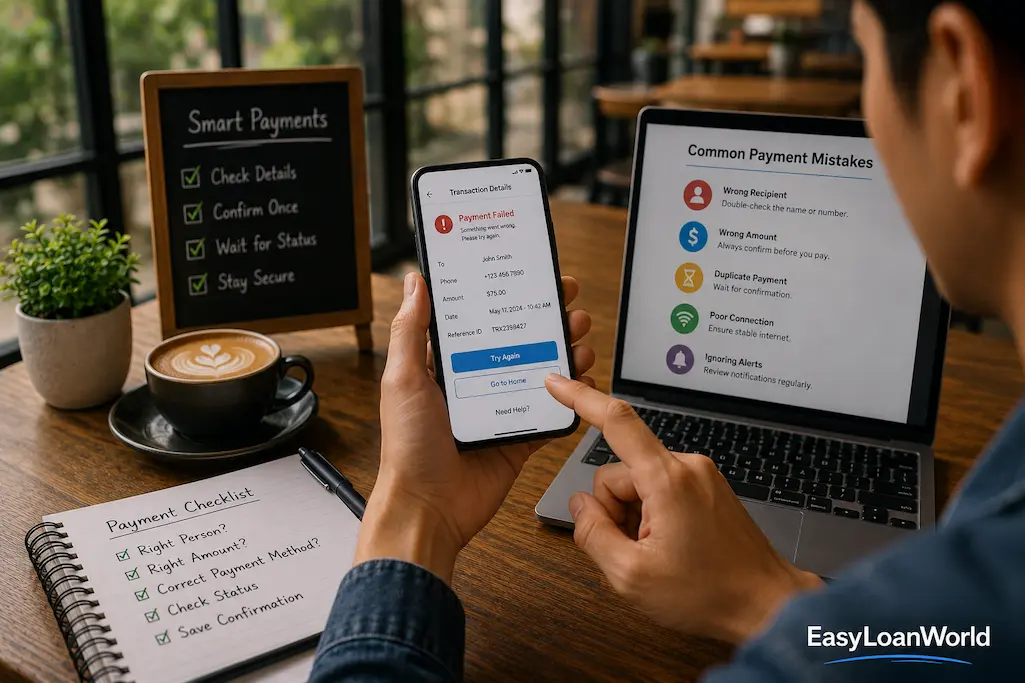
- Please confirm the recipient’s name or account information.
- Please double-check the payment amount.
- Read the confirmation screen before tapping “Pay.”
- Wait for the final transaction status instead of assuming the outcome.
- Keep your wallet application updated to benefit from the latest security and stability improvements.
These habits usually add less than a minute to the payment process, yet they can prevent hours of frustration later.
Don’t Let One Mistake Damage Your Confidence
Making a payment error can be frustrating, especially if you’ve always considered yourself careful with money. However, digital payment mistakes are more common than many people realize. They happen to experienced users as well as people who have only recently started using digital wallets.
The important lesson isn’t to avoid digital payments altogether. Instead, it’s to develop a calm, methodical approach when something unexpected happens. Knowing how to respond gives you greater confidence the next time you encounter a delay, an incorrect transfer, or an unfamiliar transaction.
Every payment experience, including the occasional mistake, can help improve your understanding of how digital financial tools work in everyday life.
Final Thoughts
Digital wallets have made everyday payments faster than ever, but speed can sometimes make it difficult to reconsider your choices. A payment that you complete in a few seconds can take much longer to resolve if you make the wrong decision immediately afterward.
Whether you’ve entered the wrong amount, selected the wrong recipient, or experienced a delayed confirmation, the best response is usually the simplest one: pause, verify the facts, and choose your next step based on reliable information rather than assumptions.
Recovering from payment mistakes isn’t about acting as quickly as possible. It’s about acting carefully enough to avoid creating additional problems. A calm review of the transaction, combined with accurate records and timely communication when needed, often leads to a smoother resolution than rushed decisions ever could.
Frequently Asked Questions
Can I cancel a digital wallet payment after sending it?
It depends on the payment provider and the type of transaction. Some payments can be canceled if they haven’t been accepted or completed, while others become final almost immediately. Always check your wallet provider’s policies.
What should I do if I accidentally send money to the wrong person?
Review the transaction details, save the reference number, and contact your wallet provider through its official support channels as soon as possible. If appropriate, you may also contact the recipient or merchant using verified contact information.
Why is my payment still showing as pending?
A pending status usually means the transaction is still being processed between the payment provider, financial institution, and merchant. This doesn’t necessarily indicate a problem, and many pending payments are completed automatically.
How can I avoid making duplicate payments?
Before trying again, please check your transaction history and allow time for the payment status to update. If you’re paying a merchant, please confirm whether they have already received the payment before initiating another transaction.
Should I take screenshots of payment confirmations?
Keeping a copy of important payment confirmations can be helpful, especially for larger transactions or purchases involving businesses. They provide useful information if you need assistance from customer support later.
What is the best habit for reducing digital wallet payment mistakes?
Taking a few extra seconds to verify the recipient, payment amount, and transaction details before confirming the payment is one of the simplest and most effective ways to reduce common payment errors.