Credit Utilization: Calculate It and Check Reporting Dates
Calculate credit utilization from matching balances, full limits and reporting dates. Includes a two-card example, a snapshot comparison and practical checks for discrepancies.
Estimated reading time: 8 minutes
Credit utilization is the share of your revolving credit limit that a balance uses. Divide the balance by the full credit limit, then multiply by 100. When checking a credit report, use the balances and limits on that report rather than assuming the amount currently shown in your card app describes the same moment.
A payment can reduce what you owe without immediately changing the record you’re reading. Start with the reporting date. Matching it to the account helps you separate an ordinary timing difference from a possible error.
This guide covers U.S. credit cards. Its hypothetical dollar examples illustrate arithmetic only.
Calculate credit utilization with the full limit
The formula is:
Balance ÷ full credit limit × 100 = utilization percentage.
A hypothetical $1,000 balance on a $4,000 limit gives $1,000 ÷ $4,000 × 100 = 25%. The $3,000 you haven’t used is available spending capacity in this simplified example. It isn’t the denominator. Dividing by that smaller number would answer a different question.
FICO’s revolving-account explanation describes this balance-to-limit calculation and explains that its scores use information reported to a credit bureau. Keep that distinction in view when comparing a score dashboard with a bank app.
Write down where each input came from. A correct calculation still becomes misleading when you pair today’s balance with an old limit, omit a card from one side of the equation, or attach a reported-balance label to an amount that only appears in your current app. Keep the inputs consistent.
Two cards can tell different stories
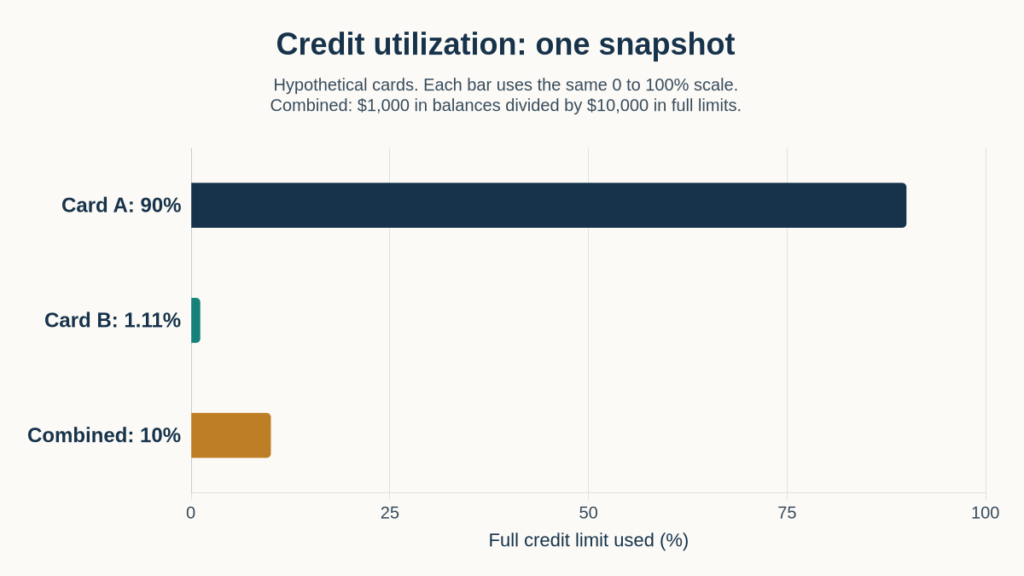
Suppose these are your only two ordinary open credit cards, and both balances describe the same hypothetical reported snapshot. The numbers deliberately use very different limits.
| Account | Reported balance | Full limit | Utilization |
|---|---|---|---|
| Card A | $900 | $1,000 | 90% |
| Card B | $100 | $9,000 | About 1.11% |
| Combined | $1,000 | $10,000 | 10% |
Add the balances first: $900 + $100 = $1,000. Then add the limits: $1,000 + $9,000 = $10,000. Dividing those totals produces 10%.
Averaging the individual percentages would give about 45.56%, treating the small-limit card as though it carried the same weight as the large-limit card, even though the calculation needs to reflect their different limits. Use 10% for the combined ratio and keep each individual result beside it.
The chart accompanying this guide uses one scale for all three results, so the difference stays visible. Each bar represents the percentage of the full credit limit used.
Card A’s credit utilization remains at 90% even though the combined figure looks much lower. FICO’s account-level guide says its scores consider overall utilization and high utilization on specific revolving accounts. A favorable-looking total can coexist with a heavily used individual account.
To decide which payment would save the most interest, you would need each card’s actual interest terms and payment obligations as well as enough information about your budget to check whether the proposed payments fit. This chart compares utilization only.
A paid balance can still appear on your report
Continue the same example. Assume a $700 payment to Card A has posted, Card B still has a $100 balance, and nothing else has changed. There are no new purchases, fees or interest, and both limits remain the same.
Card A’s later app balance would be $200. Its individual ratio would be 20%. The combined app balances would total $300, giving $300 ÷ $10,000 × 100 = 3%.
Earlier reported snapshot
$1,000 total balance
$10,000 full limits
10%
Later app snapshot
$300 total balance
$10,000 full limits
3%
Hypothetical $700 posted payment. Unchanged limits; no other activity. These stages illustrate arithmetic, without setting a reporting schedule.
An earlier report showing 10% credit utilization and a later app showing 3% can both describe their own snapshots correctly because each calculation uses the balance from its particular point in the sequence. These invented stages illustrate timing without promising when an issuer will report a payment.
The CFPB explains that paying in full every month can help your scores, while the balance present when a score is calculated can still matter. Paying tomorrow doesn’t change what a calculation used today.
Keep the following dates separate when checking a mismatch:
- The statement closing date marks the end of the period covered by that statement.
- The payment due date tells you when the required payment is due.
- The payment’s posted date helps establish whether the issuer has applied it.
- The account’s reported or updated date identifies the record on the credit report.
Downloading a report today doesn’t establish that every account on it was updated today. Read the date attached to the account entry. If the label is unclear, ask the issuer which balance it reported, to which bureau, and for what date.
That gives the conversation a specific question. Asking the issuer to confirm the reported balance for the date on your report, while explaining that the app now shows $200 after a payment, makes the discrepancy easier to investigate.
What does the 30% guideline actually mean?
Treat 30% as a broad guideline rather than a pass mark. FICO says its data doesn’t support a universal scoring drop at that threshold. The effect depends on the rest of the person’s credit information.
Lower credit utilization generally helps, but a percentage alone cannot guarantee a particular score or borrowing rate, tell you whether an application will succeed, or explain every change you see between two credit-score updates. Moving from 31% to 29% has no published, universal points award.
There’s also a distinction between reporting some use and paying interest. The CFPB says you don’t need to carry a credit-card balance to get a good score. Don’t keep interest-bearing debt just to make a utilization display look active.
Use the number to understand your records, then consider the rest of your finances. A payment plan that creates a cash shortfall for another required bill needs a budget check, even when it produces an attractive ratio in a calculator.
Check which accounts the number includes
When two services show different totals, compare the account lists they use before assuming their division is wrong, especially if one display combines ordinary cards with other types of credit.
FICO’s account-level guide explains that personal lines of credit can affect utilization. It generally excludes HELOCs from this calculation and excludes charge cards reported as open-type accounts. Closed revolving accounts with positive balances can still count. Those distinctions matter when a dashboard includes more than ordinary open cards.
Model versions matter too. Most FICO scores use the most recently reported account information for utilization, while FICO Score 10T also considers trends in credit history. The same FICO guide describes these account and model differences.
Our two-card arithmetic can’t reproduce those scoring decisions. Use it to check the displayed inputs, and ask the service what its particular utilization figure includes.
Choose the next check from the mismatch
If the dates differ, establish the sequence first. Confirm whether the payment posted, then compare the report entry with the issuer’s information for that reporting date. A pending payment and a posted payment aren’t the same evidence.
For a missing or zero limit, stop before dividing. A zero denominator doesn’t produce a usable percentage. Don’t invent a limit or display 0% as if the calculation succeeded. Ask the issuer or reporting service how it handles that account.
A balance above its limit can produce utilization above 100%. For instance, hypothetical balances of $1,100 against a $1,000 limit give 110%. Capping that result at 100% would hide part of the arithmetic. Negative balances and accounts without preset limits need their own explanation rather than a forced fit into this example.
If the underlying reported information appears inaccurate after you match the records, use the CFPB’s credit-report dispute instructions. The CFPB generally directs consumers to contact both the credit reporting company and the business that supplied the information.
Identify the particular entry, explain what is wrong, and retain copies of supporting records. A percentage difference by itself isn’t a complete explanation of an error. Keep account numbers and report screenshots in your private records rather than posting them publicly.
Reproduce the example before using your own figures
The calculator below preserves the original article’s useful arithmetic check. Enter a combined balance of $1,000, a full limit of $10,000 and a planned payment of $700. With unchanged limits and no other activity, the starting result is 10% and the modeled result is 3%.
Then check Card A separately using $900, a $1,000 limit and the same $700 payment. Its result moves from 90% to 20%. Keep this individual credit utilization result separate from the combined result because they describe overlapping accounts.
A planned payment models a possible balance reduction. It doesn’t confirm receipt, reporting or a future score. Follow actual payment deadlines independently of this exercise.
For a fuller worksheet, use our credit utilization calculator. If you need the underlying report, start with our guide to official free credit-report access. Questions about disputed entries belong in the credit report errors guide.
Before changing a payment purely because two displays disagree, put the balance, full limit and record date beside each other. Check the mismatched input first.
Sources
Sources checked November 3, 2026. Examples and chart calculations are original hypothetical illustrations.