Personal Loan Application Documents: Build a Complete, Secure File
Build a lender-specific document tracker, check pay periods, and follow up on missing items without sending more information than requested.

Start a personal-loan application file with the lender’s current instructions for your application. Track what it requested, which dates each record must cover, how to submit it, and whether the lender accepted it. A folder full of documents is useful only if it answers the actual request; it does not establish approval or make a loan affordable.
Use the checklist below in your own private notes. Do not send identity documents, income records, account numbers or identification numbers to EasyLoanWorld.
Separate application answers from supporting records
For example, Wells Fargo’s application checklist distinguishes information needed to apply, such as employment, gross monthly income and the requested loan amount, from additional documents requested as necessary. Those documents may include pay stubs, tax records or address verification. This is one lender’s example, not a universal packet.
Create three short lists: answers to enter, supporting records actually requested, and questions you cannot yet answer. Keep a document on the second list only when it is requested; having a record available does not mean you should upload it.
Ask: “Which documents do you need for this application, which dates must they cover, and how will I know you have accepted them?” Record the response and any deadline the lender gives you.
Build a request-specific document tracker
Give each requested item its own entry. Use the following headings where relevant; they are organizing prompts, not a list of documents every applicant must provide.
- Identity or contact details: Record what the lender wants verified and any name or address difference you need to explain.
- Income: Note the income type, requested evidence, period covered and payment frequency. List any unanswered question separately.
- Funding or creditor payment: Note who is responsible for providing instructions and confirming the destination. Keep actual account details in the lender’s approved secure system.
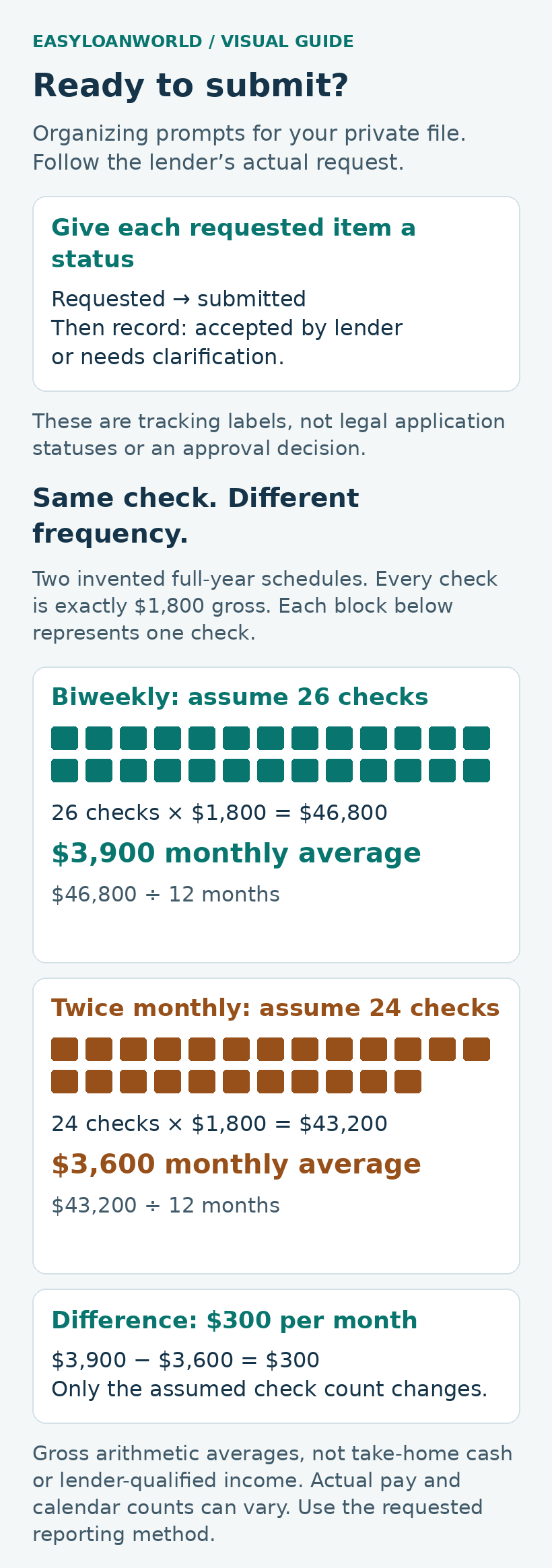
- Status: Use requested, submitted, accepted by lender, or needs clarification. Leave irrelevant items marked not requested.
SoFi’s income-document guidance, for example, treats wage, variable-pay, retirement and self-employment records differently. It may seek clarification of pay frequency or additional income history. Its self-employment requirements also vary by business structure. Follow your lender’s actual request rather than assuming one pay stub or tax return answers every situation.
Discover’s application guidance includes creditor balances and account information for consolidation applicants. If that is your purpose, ask which creditor details and payoff instructions your lender needs, who sends the money, and how the destination is verified.
A useful entry might read: “Requested income record; period confirmed with lender; uploaded Tuesday; receipt saved; acceptance still outstanding.” This avoids treating a successful upload as the end of the task.
Check pay frequency before entering an income figure
Read the field label carefully: per paycheck, monthly and annual amounts are different units. Gross income is before payroll deductions; it is not the take-home cash available to make loan payments. Keep the application figure and your household spending plan separate.
Consider an arithmetic example with two fictional payment schedules. Assume every paycheck is exactly $1,800 gross and the stated number of checks covers one full year.
- 26 biweekly checks: $1,800 × 26 = $46,800 annually. Dividing by 12 gives a $3,900 monthly average.
- 24 twice-monthly checks: $1,800 × 24 = $43,200 annually. Dividing by 12 gives a $3,600 monthly average.
The $300 monthly difference comes entirely from the assumed pay frequency. It is not a raise or an extra $300 to spend. These are arithmetic averages, not a lender’s determination of qualifying income.
Real pay can vary, and a calendar can contain a different paycheck count. Document your actual schedule, follow the form’s instructions and ask how to report irregular earnings. Do not replace a required figure with your own average simply because the calculation is convenient.
Check the requested files before uploading
Use a short inspection pass instead of sending a large bundle “just in case.” For each requested record:
- Check the name and reporting period against the request.
- Make sure the text is legible and pages are not accidentally cut off.
- Ask whether all pages are required and which file formats or photographs the lender accepts.
- If a record is wrong, obtain a correction or ask how to explain the discrepancy. Do not alter evidence to match an application.
- Ask before redacting requested material, so the lender can explain what it needs.
- Keep a private copy of what you submitted and the submission receipt.
A simple file label using the record type and covered period can help you distinguish versions. Avoid putting identification or account numbers in filenames. If you replace an earlier upload, note which version the lender should review.
Verify the channel and follow up on missing items
A familiar logo does not authenticate a request. The FTC’s phishing guidance recommends contacting a company through a website or number you know is genuine rather than relying on a suspicious message’s links or contact details. Reach your lender independently and confirm its approved document-submission route before responding to a questionable request.
If asked to connect a bank-data service, read the information and permissions requested and ask what alternatives are available. Do not assume every lender offers the same choices.
Keep this compact follow-up log:
- Requested item and covered dates.
- Date sent, submission channel and receipt reference.
- Lender’s acceptance or correction request.
- Remaining question, next step and stated deadline.
If asked to resend something, reconcile the request with your existing receipt. Ask whether the first file was unreadable, incomplete, outdated or simply not yet reviewed. An upload receipt records submission; seek a separate answer about acceptance and completeness.
A useful question is: “Your portal shows my upload. Is that document accepted, what remains outstanding, and is my application considered complete?” Keep the answer with the file.
Finish with a borrowing decision, not just a completed folder
Before moving ahead, check that the borrowing need is still current, your answers are accurate and every missing item has a confirmed next step. If an offer arrives, review its payment, total cost and fit with your budget separately. The guide to shorter versus longer personal-loan terms can help organize that comparison.
U.S. consumer education. Lender requirements vary. Sources checked October 19, 2026.
Featured photo: Photo by Beatriz Pérez Moya on Unsplash. Used under the Unsplash license. Illustrative stock photograph of binders. No actual applicant file or required document packet is shown. Photo by Beatriz Pérez Moya on Unsplash.

Keep Savings or Pay Extra on a Personal Loan? Compare Cash and Debt
A fictional three-payment comparison shows how extra principal changes cash, debt, and interest, then tests which expenses the remaining cash can cover.

Payday Alternative Loans: Your Options
Screen three cash needs, then compare actual offers.

Stop Loan Autopay: Separate the Debit From the Debt
Review a fictional $210 payment, trace a $420 cash outflow, and compare the supporting records before treating an unexplained difference as resolved.